Types of Web Hosting - Complete Professional Guide
Your complete guide to choosing the best hosting for your business - from Shared Hosting to Dedicated Servers and Cloud

What is Web Hosting?
Web hosting is a service that provides space on a server to store your website's files, codes, and content. With hosting services, all parts of your website become accessible on the internet.
Simply put, every website you visit is stored on a server. Hosting is the space on that server that makes your website accessible to users.
| Feature | Description |
|---|---|
| Definition | Space on a server to store website files and display them on the internet |
| Usage | Store website data, display web pages, run scripts, connect domain to content |
| Main Types | Shared, VPS, Dedicated, Cloud, WordPress Hosting |
| Cost | Varies based on hosting type, allocated resources, and server location |
| Benefits | Easy setup, affordable cost, 24/7 availability, upgrade options |
1. Types of Hosting by Service Type
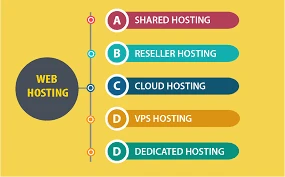
Shared Hosting
Shared hosting is the most popular type where hardware resources of one server are shared among multiple websites. It's affordable and suitable for small to medium websites with low traffic.
Pros
- Low cost
- Easy management
- Beginner-friendly
- Technical support included
Cons
- Limited resources
- Slower during peak traffic
- Less control
- Dependent on main server performance
VPS (Virtual Private Server)
VPS is similar to a dedicated server, but hardware resources are divided among virtual servers using virtualization technology. You get a dedicated-like experience at a lower cost.
Pros
- More control than shared
- Dedicated resources (CPU, RAM, disk)
- Root access to OS
- Custom configuration
Cons
- Higher cost than shared
- Technical knowledge required
- Some configuration limits
Dedicated Server
With dedicated hosting, an entire server is exclusively for your website. You have complete control over the server and all its resources.
Pros
- High performance and speed
- Full control
- Maximum security
- Best for large organizations
Cons
- Very expensive
- Requires expert management
- Upgrade requires hardware changes
Cloud Hosting
Cloud hosting uses multiple servers for hosting. If one server fails, another takes over immediately. Best for websites needing constant uptime.
Pros
- High scalability
- Excellent uptime
- Pay-as-you-go pricing
- Easy workload management
Cons
- Strict regulations in some companies
- Network dependency
- Requires high-speed internet
2. Types of Hosting by Operating System
Linux Hosting
Linux hosting uses the Linux operating system on servers. Linux is open-source, free, and the most popular choice for web hosting.
- Pros: High stability, strong security, supports PHP/Python/Ruby, low cost
- Cons: May be complex for beginners
- Best for: WordPress, Joomla, Drupal sites, e-commerce stores
Windows Hosting
Windows hosting uses Windows Server operating system. Ideal for websites developed with ASP.NET and MSSQL database.
- Pros: Excellent compatibility with Microsoft products, supports ASP.NET and C#, easy to use
- Cons: Higher license costs, fewer tool options compared to Linux
- Best for: ASP.NET websites, large enterprises
3. Types of Hosting by Control Panel
cPanel
The most popular hosting control panel with graphical interface. Quick script installation, email and database management.
DirectAdmin
Simple and efficient control panel with lower resource consumption. Suitable for servers with weaker hardware.
Plesk
Professional control panel installable on both Linux and Windows. Beautiful interface and complete features.
4. Types of Hosting by CMS
WordPress Hosting
Optimized for WordPress with high speed, advanced caching, and security. Best choice for WordPress sites.
Joomla Hosting
Suitable for Joomla sites with PHP and MySQL support and security features.
E-commerce Hosting
Optimized for online stores with fast transaction processing and high security.
5. Types of Hosting by Geographic Location
Local Hosting (Inside Iran)
- High speed for Iranian users due to proximity
- No downtime during international internet issues
- Better privacy under local laws
- Persian support and local currency payment
International Hosting
- Access to global tools and technologies
- Not affected by local Iranian internet restrictions
- Often lower costs
- Ability to reach international audience
Complete Comparison Table
| Hosting Type | Speed | Security | Cost |
|---|---|---|---|
| Shared | Medium | Medium | Low |
| VPS | High | High | Medium |
| Dedicated | Very High | Very High | High |
| Cloud | Very High | High | Pay as you go |
Important Hosting Terms You Should Know
Storage Space
The amount of space available for storing files, images, and databases.
Database
Where dynamic site data like posts, users, and products are stored.
Bandwidth
Data transfer rate per second. Higher bandwidth = more simultaneous users.
SSL Certificate
Security certificate for encrypting communication. Essential for payment gateways and Google ranking.
Uptime
Website availability percentage. Ideal standard is 99.9%.
Programming Language
Linux hosts support PHP/Python; Windows hosts support ASP.NET.
How to Choose the Right Hosting?
Based on Your Needs
- Beginner with small site: → Shared Hosting (recommended)
- Corporate site with medium traffic: → Professional Shared or VPS
- E-commerce store: → Professional WordPress Hosting or VPS
- High-traffic site (50,000+ monthly visits): → VPS or Dedicated
- Large store with many transactions: → Cloud or Dedicated Server
- Iranian audience: → Local hosting (better speed)
- International audience: → Foreign hosting (Germany, Netherlands, Turkey)
Key Tips for Buying Hosting
- ✅ High uptime: Minimum 99.9%
- ✅ 24/7 support: Ticket, chat, phone
- ✅ Upgradability: Ability to increase resources when needed
- ✅ Regular backups: Daily backup option
- ✅ Free SSL certificate: For security and SEO
- ✅ Transparent pricing: No hidden fees
Frequently Asked Questions About Hosting
What's the difference between Shared Hosting and VPS?
In shared hosting, server resources are divided among multiple sites, while VPS provides virtually dedicated resources. VPS offers more control and is suitable for higher-traffic sites.
Local hosting or International hosting - which is better?
If your audience is in Iran, local hosting provides better speed. For international audiences or if you need specific technologies, international hosting is better.
Can I upgrade my hosting plan?
Yes, most hosting providers allow upgrading from shared to VPS or dedicated servers. This is usually done without site interruption.
How much does each hosting type cost?
Shared hosting starts around $3-5/month, VPS from $20-50/month, dedicated servers from $100+/month. Prices vary based on resources and provider.
Do I need professional hosting to start?
No, basic shared hosting is enough to start. You can upgrade as your site grows and traffic increases.
📌 Conclusion
Hosting is the foundation of any website, playing a key role in speed, security, and stability. The right choice can pave your path to online success.
- To start: Shared hosting is an economical and suitable option
- As your business grows: Upgrade to VPS or cloud hosting
- Very high-traffic sites: Dedicated servers are the best choice
- Always consider uptime, support, and security.
Need help choosing hosting?
I'm here to help you select the best hosting based on your needs and budget.
Contact Me